
As a Managed IT Service Provider (MSP), we’ve always preached that backups, recovery plans and business continuity plans are crucial. But it’s not just us saying that; we did a little research, and this is what we saw:
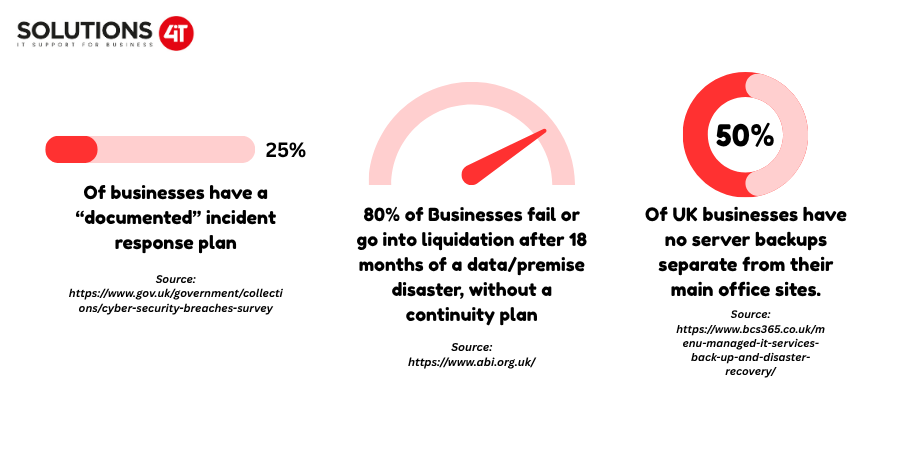
Statistics will only give half of the story, though, so we’re going to share our experience as an MSP to highlight the importance of backups and business continuity plans.
Here’s the shortest answer we can give. Backups are your last line of defence. If a major system outage occurs due to a malicious threat or an act of nature, having your data backed up and stored in multiple locations lets your business return to normal operations as quickly as possible. As our infographic shows above, MANY businesses do not have off-site server backups, which means that a physical ‘disaster’ has a very real risk of taking a business from seemingly healthy growth to near liquidation within 18 months.
Beyond external research, we’ve seen many times as an MSP how backups have saved certain customers from catastrophe. Equally, we’ve seen them as one of the biggest danger signs we see in an onboarding customer’s current IT infrastructure. Therefore, we check an organisation’s backup policies as part of our Free IT Review. Its importance cannot be understated, so if you’re looking for an outsourced IT Services Provider, this is one thing you should hope they’d check!
Going hand in hand with backups, as in the name, if a ‘disaster’ does happen, either on-site or digital, you will be very grateful to have one of these. The reason you should employ a disaster recovery plan within your business is that a disaster recovery plan contains all the key personnel contacts, site locations, and the location and details of your backups. This document then becomes your guide on how to make sure that your business can return to an operational status as quickly as possible, which directly aids business continuity. Downtime is often even more damaging to businesses than the initial impact of a cyber attack / ‘disaster’, which is why policies must be put in place on how to respond; otherwise, you will be improvising a crisis.
You should have regular backups being created; the frequency should be based on the type of data you have and what risk that poses should it be lost. These should be stored in multiple locations, often 1 stored on-site, 1 stored on removable media that is taken off-site and preferably stored in a fireproof safe and one stored in the cloud. Backups should be checked regularly to ensure they are running.
Test restores should be performed periodically to ensure that the data is recoverable and usable.
If you have an existing IT Department, either internal or external, make sure they are doing this. If you’re looking for one, as mentioned earlier, make sure they are checking for this during onboarding! It’s a sign in the early days that can potentially save you from disaster later on down the line.
A backup is a copy of your business data that can be used to recover lost or damaged information. A disaster recovery plan is the wider process for restoring your IT systems and getting your business operational again after an incident. Backups are therefore one part of a disaster recovery strategy, rather than a replacement for one.
Storing backups in multiple locations reduces the risk of losing both the original data and its backups during the same incident. For example, a fire, flood, theft or other physical disaster could affect both a server and a backup stored in the same building. Keeping copies off-site and, where appropriate, in the cloud provides additional protection against a single location being compromised.
No. Backups don’t automatically mean a business can recover its data. Monitor backups regularly and restore them periodically to confirm the data is recoverable and usable. A backup that has silently failed or cannot be restored when needed provides little protection during a real incident.
A disaster recovery plan sets out how a business will respond to an IT disaster and restore its systems and data. It can include key personnel and contact details, system and site information, backup locations, recovery procedures and responsibilities. Having this information documented gives the business a structured response to an incident rather than requiring staff to work out what to do during a crisis.
Business continuity is the ability of an organisation to continue providing its services and operating during and after a disruption. Disaster recovery focuses more specifically on restoring IT systems, applications and data following an incident. A disaster recovery plan can therefore support business continuity by helping the organisation restore the technology it relies on to operate.
A small business disaster recovery plan should identify the systems and data that are critical to operations, key personnel and their contact details, backup locations, recovery procedures, important suppliers and IT contacts, and the steps required to restore essential services. The plan should be documented, kept accessible during an outage and reviewed periodically as the business’s IT environment changes.
We hope you enjoyed our blog! We’ll be releasing weekly uploads around articles like this, as well as big news in the cybersecurity scene. Stay safe!