
Yesterday, a report from Push Security revealed a newly discovered phishing campaign- using Calendly to steal Google/Facebook ad logins. The meeting invite method of phishing isn’t new, but the particular attacks that Push Security identified have been classified as “sophisticated”. Let’s go over how this attack works and what you can do to avoid falling victim to it.
First off, you receive an invite from Calendly… from Disney? Amazing! You’d presumably take that job offer. You might even check the email to see any obvious signs of a phish, like a spelling error, but there aren’t any. The email seems very informed too, potentially praising you for your current work and job role, so it can’t be fake, right? An example would look like this:
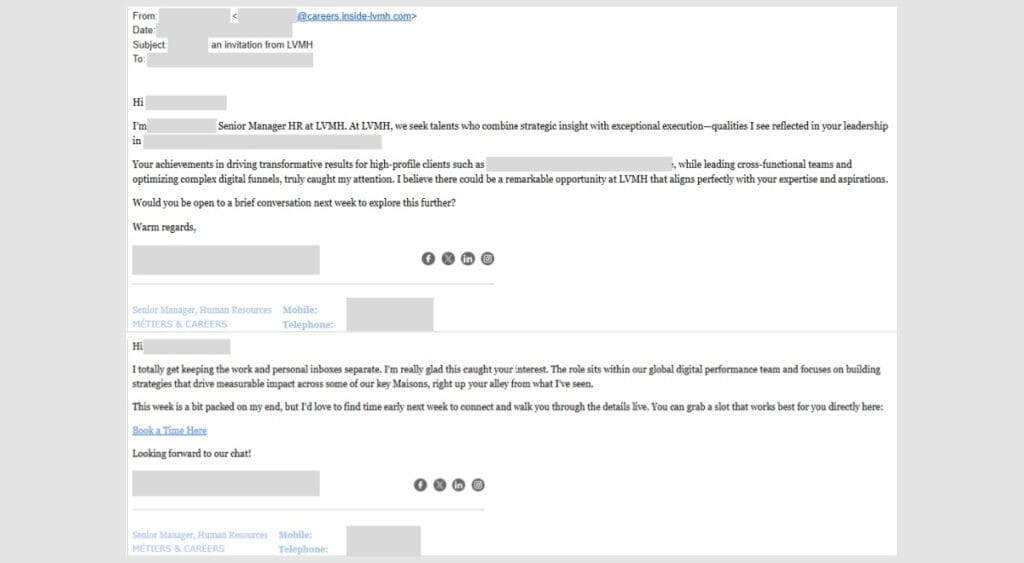
Image credit- Push Security
You reply to the email, and sure enough, they will respond with a link to schedule a call. Clicking on that link, you’ll find a log-in page that could be nearly identical to Calendly’s. The first thing you’ll see is an option to log in with your Facebook or Google account credentials. After that, you’ve just handed your login details to the threat actor.
As recently covered in our blog on the NCSC 2026 Cyber Security Forecast, threat actors are leveraging AI toolkits to reinforce phishing scams. Unfortunately, looking out for spelling/grammar mistakes is not as effective as it used to be. As you can see in the above example.
Additionally, the specific attacks found by Push Security are highly tailored to the victim. If you see an email from someone who knows your name, job title and praises the work you do, you’re already going to be more trusting towards the sender than if it were someone who just sent you a generic email.
Push Security provided a few ways to stay aware and protected from this attack. Here’s a quick summary:
In conclusion, although it is a shame, it’s unlikely that if you receive a Calendly job invite from Disney, it’s a genuine one. Exercise caution and have MFA enabled as a last resort.
We hope you liked this blog! We cover everything from cyber attacks like this one to more generalised blogs around IT Support. Stay safe!