
Key Summary
You’d expect downloading Google Chrome from Google’s own app store to be a fairly safe bet. After all, it’s Google’s browser, distributed through Google’s platform.
Unfortunately, things aren’t always quite that straightforward.
A fake version of Google Chrome recently appeared on the Google Play Store, copying the genuine browser’s name, icon and description. The listing reportedly accumulated more than 100,000 downloads, and a screenshot shared online showed it appearing as a sponsored result above the real Chrome app.
The counterfeit application was published by a developer named Hizbartech, rather than Google LLC.
There’s an important detail here, though. The app originally launched in August as a game called Ball Bounce. It was only renamed to resemble Google Chrome on 30 September.
That means the reported 100,000 downloads represent its cumulative total, rather than confirmed downloads of the fake Chrome app specifically. We don’t know how many people installed it after the name and branding were changed.
Still, it’s a concerning example of how easily an existing application can potentially be repackaged to impersonate a trusted brand.
At the time of reporting, it wasn’t confirmed whether the application contained malware or stole personal information.
Users investigating the app on Reddit reported finding a messaging-style interface with AI-generated avatars and pre-programmed responses, rather than a functioning web browser.
Some suggested that the application may have been designed to generate advertising revenue by showing users repeated adverts when they opened it.
That remains speculation, however. There isn’t enough confirmed information to conclude exactly what the developer intended or whether the app exposed users to more serious security risks.
Regardless of the developer’s intentions, an application pretending to be a trusted browser is a problem in itself. Users could reasonably expect it to behave like Chrome, potentially giving it access to permissions or information they wouldn’t otherwise share with an unfamiliar application.
Perhaps the most concerning part of this story isn’t simply that the fake application made it onto the Play Store; it’s that a screenshot shared online showed it appearing as a sponsored result above the genuine Google Chrome browser:
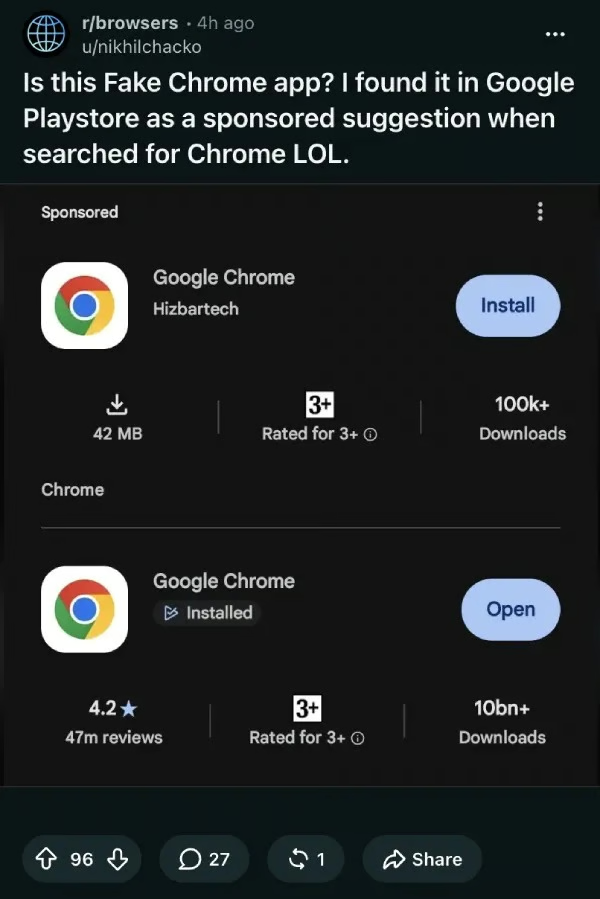
Credit: Reddit/ browsers/nikhilchacko
Sponsored listings are advertisements that appear within search results. Businesses and developers can pay to promote their products, giving them greater visibility than results that appear organically.
Most people understand that advertising doesn’t automatically mean a product is trustworthy. However, when you’re searching for a well-known application on its official app store, it’s understandable to assume that a prominent result has been properly checked.
That’s where the problem lies.
The screenshot couldn’t be independently reproduced during the reporting team’s checks, so the precise circumstances surrounding the advertisement remain unclear. Nevertheless, the incident raises questions about how the application passed the platform’s checks and how it was able to appear as a promoted result.
Google has since removed the application from the Play Store, although it hadn’t explained how the listing passed its checks at the time of reporting.
It’s an awkward situation for Google, particularly given its efforts to tighten restrictions on installing applications from outside the official Play Store in the name of user safety.
If a counterfeit application can appear to be a legitimate product within the official store, simply telling users to avoid downloading apps from elsewhere doesn’t address every risk.
The good news is that there are a few simple checks you can make before installing an application. They won’t guarantee your safety, but they can help you spot obvious warning signs.
This is one of the simplest checks you can make.
Before downloading an app, look at the developer or publisher name. If you’re downloading Google Chrome, for example, the publisher should be Google LLC.
A familiar name or recognisable logo isn’t enough on its own. Both can be copied, so check the publisher details as well.
Advertisements can be useful for finding products and services, but a sponsored listing isn’t a guarantee that an application is legitimate or safe.
If you’re looking for a specific app, take a moment to check the publisher and make sure you’re selecting the genuine product rather than the first result you see.
This applies to desktop software, browser extensions and mobile applications alike.
A large number of downloads can make an application appear trustworthy, but it isn’t proof that it’s legitimate.
In this case, the app had already existed as a game before being renamed to imitate Chrome. Its cumulative download figure therefore didn’t necessarily reflect the number of people who knowingly installed what appeared to be a Chrome browser.
Reviews, ratings and download figures can all provide useful context, but none should be treated as a guarantee of safety.
Think about whether an application’s requested permissions make sense for what it’s supposed to do.
For example, a basic calculator shouldn’t normally need access to your contacts or microphone.
Unexpected permissions don’t automatically mean an application is malicious, but they should prompt you to investigate further before proceeding.
If you’re unsure whether an application is genuine, the safest option is to stop and verify it before downloading.
For a well-known product, start with the manufacturer’s official website and follow its link to the relevant app store listing. This gives you another way to check that you’re downloading the intended application.
If you’ve already installed an application you suspect is fake, avoid entering sensitive information into it. Uninstall it, review any permissions you granted, and investigate further if you entered passwords or other sensitive details.
Official app stores, advertising reviews and familiar branding all help users identify legitimate software, but none of them should be treated as a guarantee. Even a convincing-looking application can turn out to be something entirely different.
For businesses, it’s worth going a step further. Employees downloading unfamiliar applications or browser extensions can introduce risks to company devices and potentially expose business information.
Having clear software installation policies, keeping devices up to date and ensuring employees know how to identify suspicious applications can all help reduce that risk.
The bottom line? Don’t judge an application by its logo, its position in search results or its download count alone. Check who actually published it before you trust it.
Liked this blog? We cover the latest in business technology, AI, and Cyber Security headliners, with two weekly uploads. Stay tuned, and stay safe!