

Proactive vs Reactive: everyone probably knows the difference between the two by their literal definitions; however, in business IT infrastructure, monitoring, and support, things get more complex. For all of you business owners and decision-makers reading this, knowing this distinction is vital before making further decisions, such as:
So, let’s go over what that difference looks like, in the context of business IT, and our own take on it.
Proactive support is the ability to monitor, detect and intervene in issues before they make an impact. This is usually done by maintaining things that are a lot less complex than the issues they cause if unchecked, like patching (updates), system scans, and checks.
When a business has a few hundred endpoints, for example, you can quickly see how proactively monitoring would be almost impossible without the use of automated security products and tools! Monitoring of the entire IT infrastructure, logging all the events in a centralised location, and searching for any patterns, for instance. On a smaller scale, endpoints should individually have their own security products with the ability to isolate their device from the business network if it has an issue.
So, what’s the evaluation of this service over Reactive?
+ Mitigates the risk and impact of downtime, outages, and cyber attacks
+ Acts as a preventative of IT issues in the first place, which reactive support will not offer.
– Higher, often fixed, monthly costs. While we’re a proactive Managed IT Service Provider (MSP) ourselves, it’s important to be unbiased for this article. Because your monitoring is automated and technically 24/7/365, this will be reflected in the cost too.
– Not everything can be solved proactively. Unfortunately, as amazing as it would be, proactive support can’t realistically prevent everything. With issues like a forgotten password or physical hardware damage, reactive support is still needed.
As expected, reactive support is the inverse, where your IT Support (either internal or external) reacts to any problem, typically raised by an end-user, or several if it is a widespread issue. Things such as devices crashing or applications not loading are prime examples. At this stage, your internal/external IT department will receive a notification from either the automated monitoring agent or the end user that there is an issue, and we will work with them to get it resolved as quickly as possible.
So, what’s the evaluation of this service over Proactive?
+ Ad-Hoc support contracts will generally have a lower monthly cost because you’re paying for assistance when you need it rather than paying for continuous monitoring and maintenance
– Unsurprisingly, it’s important to recognise that downtime or a data breach is a very real risk of not having proactive support, and will certainly cost you more than what was saved by choosing reactive support in the long run.
– Almost every proactive MSP will also be able to offer reactive support, whereas ad hoc IT Helpdesk contracts will not offer proactive support.

“Our systems can monitor devices 24/7 365 and, in some cases, fix issues without having to rely on an engineer to be available. Support hours are often during normal business working hours and rely on our engineers to be available to talk with end users to diagnose and fix any issues that have occurred.”
Neither approach is sufficient on its own. For most established businesses, proactive monitoring and maintenance should form the foundation of IT support, with reactive support available when unexpected problems occur. On the other hand, there are considerations that you will have to make, like:
Our automated systems look after a few thousand business endpoints (PCs and Laptops) as an MSP, and they check things such as:
Yes. While there are some nuances between the two, and a business will not automatically become ISO compliant with proactive IT Support, for example, proactive IT Support and monitoring mitigate the risk of cyber attacks, as well as their impact. Why? A reactive or adhoc contract won’t detect Cyber Security threats before they happen. Additionally, as an MSP ourselves, we help our customers with their backups and disaster recovery plans- something you will not have managed for you with an ad hoc provider!
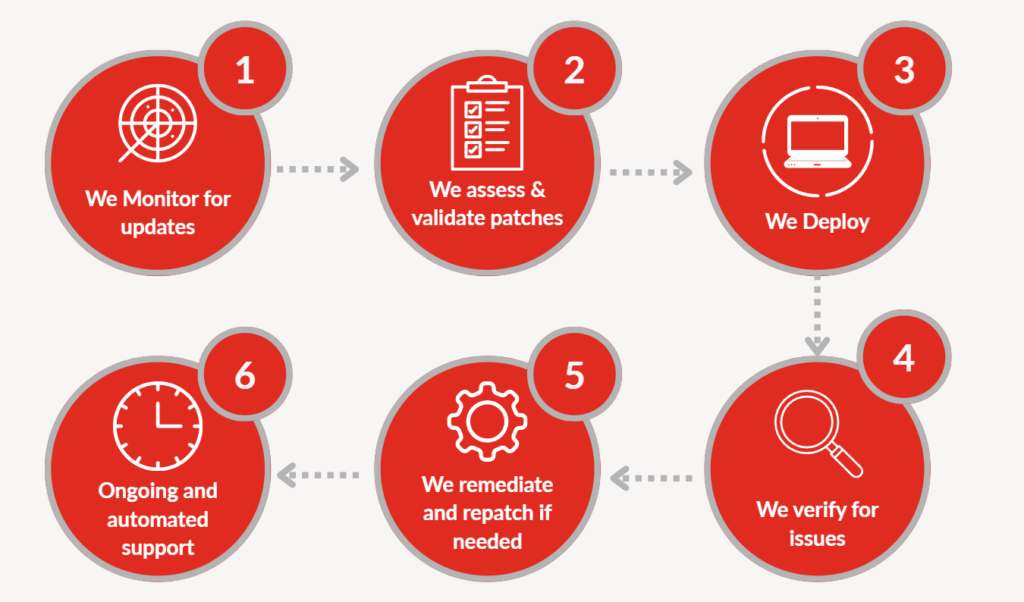
Our aim with our proactive monitoring tools and processes is for the customer to not notice them, so they can work on whatever they need to, uninterrupted. However, if you want a small look Behind The Scenes, here’s what our process for Third-Party Patching (updating applications that aren’t Windows) looks like:
We hope you’ve enjoyed our article! Every week, we release two uploads on topics like this, as well as the Cyber scene headliners. Stay tuned.